See how AI Overviews affect your clicks — right inside Search Console
GSC Insights Pro overlays AI Overview impressions, web clicks, CTR and average position on one chart, directly on your Google Search Console reports. No CSV exports. No tab-switching.
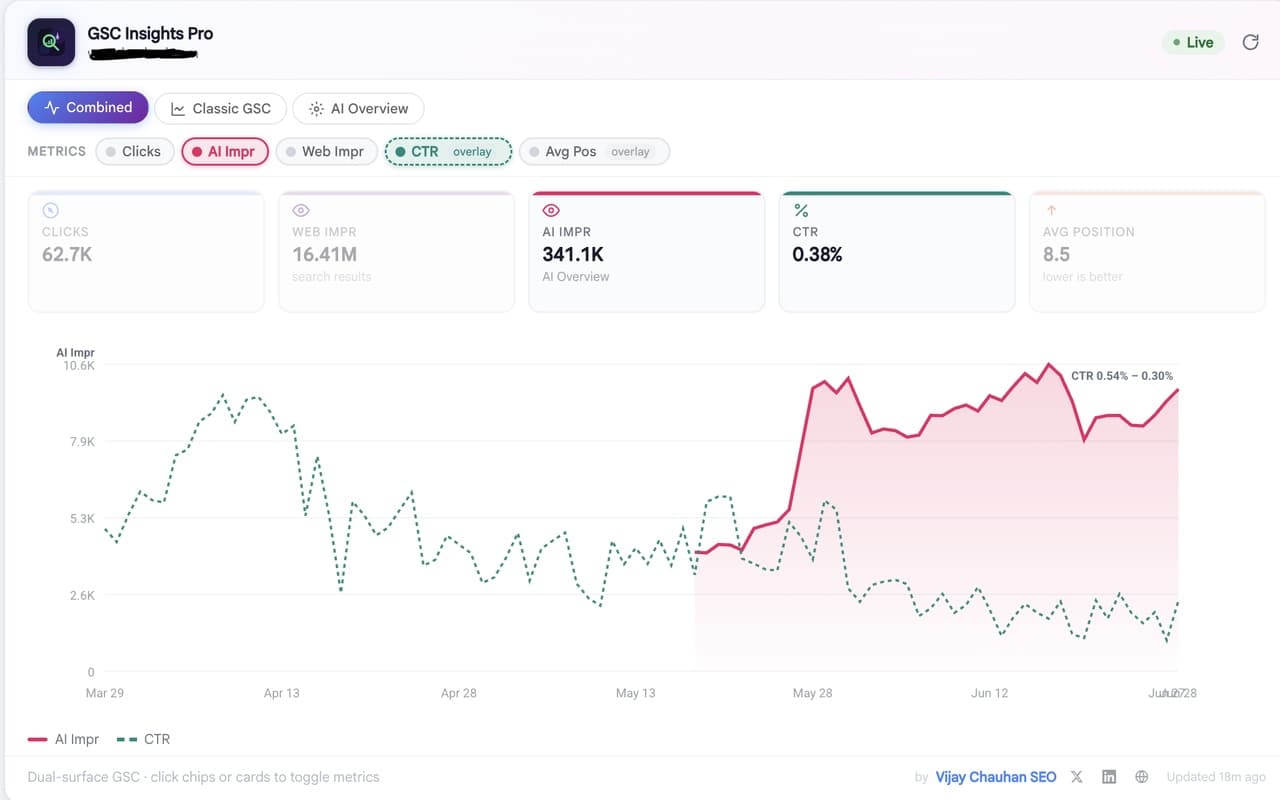
The actual overlay, running live inside Google Search Console.
Every metric GSC scatters across reports — surfaced together, at a glance.
GSC makes AI-era analysis painful
AI Overview data is buried in a separate GSC report — you can't see it next to your normal clicks and impressions.
To compare metrics you export CSVs and rebuild charts in a spreadsheet, every single time.
Clicks, impressions, CTR and position live in different views, so the full story is never on one screen.
One overlay, the whole picture
- AI Overview impressions sit right beside your clicks and web impressions.
- CTR and average position ride as overlay lines on the same chart.
- Toggle any metric on or off with a single click — no export needed.
- It all appears inside the GSC interface you already use.
Everything you need, layered right onto GSC
No dashboards to configure and nothing to export — the metrics appear where you already work.
AI Overviews, decoded
See AI Overview impressions next to web clicks, web impressions, CTR and average position — the metrics GSC keeps in separate reports, finally unified.
Three view modes
Switch instantly between Combined (unified chart), Classic GSC (full web metrics), and AI Overview (pure AI-surface data).
Interactive metric toggles
Click any chip or card to show or hide a metric and focus on exactly the signal you care about — right on the page.
Smart dual-axis chart
Auto-scaled axes for counts, with normalized overlay lines for CTR and average position, so everything reads clearly on one chart.
Instant, cached loads
Stale-while-revalidate session caching shows data instantly on repeat visits, and single-page navigation is handled automatically.
Private by design
No external servers and no data collection — every number is read directly from your own Google Search Console.
Up and running in 30 seconds
Add it to Chrome
One free click from the Chrome Web Store. No account, no setup.
Open your GSC performance report
The overlay activates automatically on the Search Console performance and AI Overviews reports.
Read AI + web metrics together
Toggle metrics and switch view modes — no CSV exports, no tab-switching, ever.
Stop exporting CSVs. See the full picture.
Install GSC Insights Pro and read AI Overview and web performance data together, right inside Search Console.
Add to Chrome — freeFrequently asked questions
What does GSC Insights Pro do?
It's a Chrome extension that overlays a unified performance chart directly on your Google Search Console reports — showing AI Overview impressions together with web clicks, web impressions, CTR and average position, so you don't have to export CSVs or switch between reports.
Is it free?
Yes, GSC Insights Pro is completely free to install and use from the Chrome Web Store.
Does it collect my data?
No. There are no external servers and no data collection or third-party sharing. All data is read directly from your own Google Search Console in your browser.
What are the three view modes?
Combined shows AI and web metrics together on one dual-axis chart; Classic GSC shows your familiar full web performance metrics; and AI Overview isolates pure AI-surface impression data.
Do I need anything besides the extension?
Just a Google Search Console account with access to your property. The extension works on top of the GSC interface you already use — no keys, servers or setup required.
GSC Insights Pro is a free Chrome extension by Vijay Chauhan, SEO consultant. It reads data directly from your own Google Search Console — no servers, no data collection. Explore more free SEO tools.